Optimizing content for search engines isn't just a technical checklist anymore. It's an art and a science, blending a real understanding of what your audience needs with the precision required to get noticed by Google. It’s about creating articles that don't just rank, but actually connect with the people reading them.
This whole process has moved light-years beyond the old-school tricks. It's time to build a solid foundation that delivers genuine value.
The Modern Blueprint for Content Optimization
Let's be honest, the days of keyword stuffing and trying to game the system are long gone. To truly optimize content for SEO today, you need a smarter, more sustainable strategy. It's less about frantically reacting to every algorithm update and more about developing a repeatable workflow that puts your reader first.
Think of it this way: your main job is to create the absolute best, most helpful resource for whatever someone is searching for. When you nail that, search engines can't help but reward you. This guide is your roadmap to doing just that, covering everything from the initial keyword deep-dive to the final touches that make your content trustworthy.
A successful optimization workflow really boils down to a few key stages:
- Strategic Keyword Research: This is more than just finding popular terms. It’s about digging into the why behind every search query.
- Intent Alignment: You have to make sure your content's format—whether it's a "how-to" guide, a product review, or a simple definition—is exactly what people expect to find.
- On-Page Mastery: This is the nuts and bolts. We're talking about methodically crafting your titles, headers, and internal links in a way that guides both your readers and search engine crawlers.
- AI as an Assistant: Smartly using tools can accelerate your research and initial drafting, but the final piece needs your unique human insight.
- The Human Touch: You need to polish your writing until it sounds natural and conversational. It’s critical. You can learn more about how to achieve a 100% human score with specialized tools, which is key to making sure your content truly connects with readers.
The core idea is simple, but powerful: write for people first, then fine-tune for search engines. When you focus on delivering real value and a great experience, you build an asset that will weather any algorithm update. This playbook will show you exactly how to put that principle into practice.
Building Your Foundation with Keywords and Intent
Look, every great piece of content that ranks well starts long before you write the first word. It begins with a bit of detective work—understanding what your audience is actually searching for and, just as importantly, why they're searching for it. This is the bedrock of SEO: getting a solid grip on keywords and search intent.
This isn't just about grabbing the keyword with the highest search volume. That's old-school thinking. Today, you have to piece together clues from different types of keywords to see the full picture of what a user really needs.
This is what modern content optimization is all about. It’s the sweet spot where your keywords, on-page SEO, and the reader’s needs all come together.
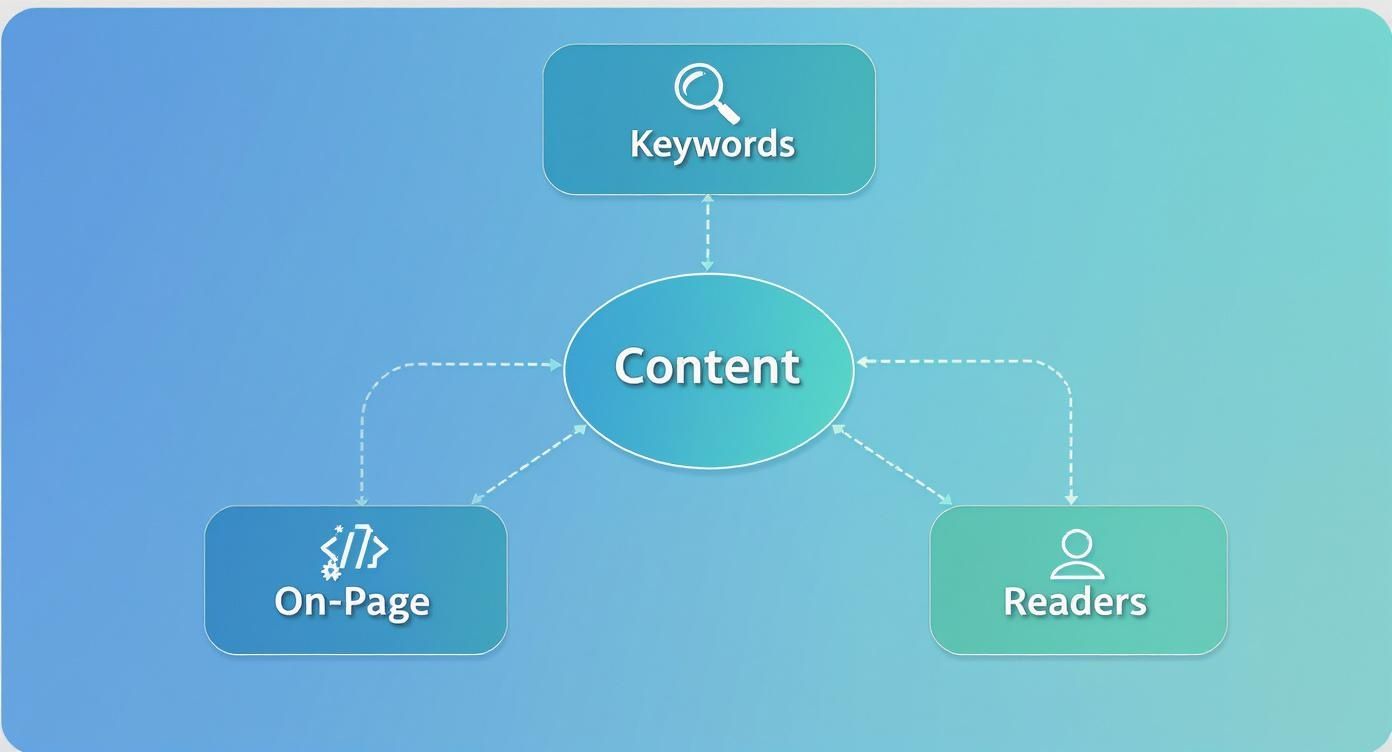
As you can see, the goal is to create something that search engines understand and that people genuinely want to read.
The Three Tiers of a Smart Keyword Strategy
I like to think about keywords in layers. Each layer has a different job, and when you put them all together, you create a powerful net that can catch your audience no matter what they’re searching for.
- Primary Keywords: These are your big-picture terms, often called "head terms." If you run a baking blog, your primary keyword might be "sourdough bread recipe." They're competitive, for sure, but they anchor your content and tell Google what it's all about.
- Secondary Keywords: These add much-needed context and show your expertise. For our baker, this would be terms like "sourdough starter feeding," "bread baking tools," or "dutch oven bread." They prove you know the topic inside and out.
- Long-Tail Keywords: Here's where the magic really happens. These are the longer, super-specific phrases people use, like "how to get a crispy crust on sourdough bread." They usually have less competition and attract people who are much closer to taking action because you're solving a very precise problem for them.
Don't forget that content quality and length are still huge factors. A study by Typeface.ai found that the average word count for a top-10 result on Google is 1,447 words. But it’s not just about length; it's about depth. The days of keyword stuffing are long gone. In fact, top-ranking pages now have 50% lower keyword density than they did just a couple of years ago.
The real opportunity? Long-tail keywords. They make up a staggering 70% of all search traffic, so weaving them naturally into your content is a must.
Getting to the "Why" Behind Every Search
Finding the right keywords is just one part of the equation. The real game-changer is figuring out the search intent—the actual goal a person has when they type something into Google. If you get this wrong, your content is dead on arrival.
A user searching for "best running shoes 2024" doesn't want a history of running footwear. They want a comparison article with clear recommendations. Aligning your content with this commercial intent is non-negotiable for success.
When you nail the intent, you give the user exactly what they came for, which builds instant trust. This isn't just good for the reader; it's a massive signal to Google that your page is a valuable result.
Aligning Content Type with User Search Intent
To make this easier, we can group search intent into four main categories. Knowing these helps you decide what kind of content to create.
| Search Intent Type | User Goal | Optimal Content Format | Example Keyword |
|---|---|---|---|
| Informational | To learn something or find an answer to a question. | Blog posts, how-to guides, tutorials, infographics. | "how to tie a tie" |
| Navigational | To find a specific website or brand page. | Homepage, contact page, specific product page. | "AI Busted login" |
| Commercial | To research products or services before a purchase. | Comparison articles, reviews, "best of" lists. | "chatgpt vs gemini" |
| Transactional | To complete a specific action, usually a purchase. | Product pages, pricing pages, sign-up forms. | "buy iphone 15 pro" |
Matching your content format to the user’s goal is one of the most effective ways to satisfy both your audience and search engine algorithms from the start.
Map Out Your Content Based on Intent
Okay, let's bring this all together into a practical step. Before writing, I always sketch out a simple intent-based content map. It’s just an outline that makes sure every section of my article has a clear purpose tied to what a reader might need.
Let’s use our target keyword, "how to optimize content for seo," as an example. The map would look something like this:
- Introduction (Informational Intent): Start by explaining what modern content optimization actually is.
- Keyword Research Section (Informational Intent): Dive into how to find the right keywords.
- On-Page SEO Section (Informational Intent): Give them the practical, step-by-step implementation details.
- Tools & Resources (Commercial Intent): Offer a quick comparison of a few helpful optimization tools.
- Conclusion (Transactional Intent): Guide them to a clear next step, like trying a tool or downloading a helpful checklist.
When you structure your content this way, you're not just dumping information on the page. You're creating a logical journey for the reader, guiding them from a point of curiosity to a point of action. That’s how you write content that truly works.
Mastering On-Page SEO for Maximum Impact
Alright, you've got your keywords lined up and a solid grasp of what your audience is searching for. Now it's time to roll up your sleeves and get into the nitty-gritty of on-page SEO. Think of this as the essential framework that supports your great content—it’s how you make sure both people and search engines can easily understand what your page is all about.
These aren't just items to tick off a checklist. They are crucial signals you send to Google that explain what your content covers and why it deserves that coveted spot on the first page.
Crafting Titles and Descriptions That Get Clicks
Your title tag and meta description are your digital handshake in the search results. They’re the very first thing a potential reader sees, and they can absolutely make or break your click-through rate. A sharp, compelling title piques interest, while a well-written description quickly sells the value inside.
For example, a title like "Blog Post About SEO" is just dead in the water. It’s forgettable. A much better approach is something like "How to Optimize Content for SEO in 2024 (A 5-Step Guide)." This version nails the primary keyword, adds a sense of urgency with the year, and clearly tells the reader what to expect.
The same goes for your meta description. Don't just throw a generic sentence in there. Offer a punchy summary that includes your keyword and a clear benefit. This is your 160-character sales pitch to convince someone your page has the answer they need.
Structuring Your Content with Clear Headings
Have you ever tried to read a book with no chapters? It’s a frustrating mess. That’s exactly what a webpage without proper headings feels like—for both your readers and for search engines.
Headings (H1, H2, H3, and so on) build a logical hierarchy for your content, breaking it up into easy-to-scan sections.
- H1 Tag: This is your page's main headline. You get one—and only one—per page. It should clearly state the core topic.
- H2 Tags: Use these to break down the main sections of your article. They are the perfect place to naturally work in your primary and secondary keywords.
- H3 Tags: These are for sub-topics within your H2 sections, letting you get more granular without overwhelming the reader.
This structure does more than just improve readability; it gives search engine crawlers a clear roadmap of your content's most important topics. It’s a simple yet powerful way to signal relevance.
The Power of Smart Internal Linking
Internal linking—the simple act of linking to other relevant pages on your own website—is one of the most underrated SEO tactics out there. When you get it right, it accomplishes three critical things: it helps search engines discover your other content, it spreads authority (or "link juice") between your pages, and it keeps visitors engaged by guiding them deeper into your site.
A well-placed internal link acts as a signpost, telling both Google and your reader, "Hey, if you found this interesting, you'll find even more valuable information over here." This simple action can significantly reduce bounce rates and increase session duration.
It's shocking how often these basics are missed. While Google rewrites a staggering 76% of titles in search results, some 7.4% of top-ranking pages don't even have a title tag. And consider this: 65% of digital marketers say link building is the hardest part of SEO, yet 55.2% of pages have zero backlinks. There’s a huge opportunity here for anyone willing to put in the work. You can dig into more eye-opening SEO statistics on Exploding Topics.
To make your internal links truly effective, always use descriptive anchor text. Ditch generic phrases like "click here." Instead, link a relevant phrase like "learn more about keyword intent." This gives both users and search engines valuable context.
Polishing the Finer Details
Beyond the big three, a few other on-page elements can really elevate your content from good to great. Paying attention to these smaller details is a hallmark of high-quality, professional SEO work.
Optimizing Image Alt Text
Every single image on your page needs descriptive alt text. This text is crucial for accessibility, as it’s what screen readers use to describe images to visually impaired users. From an SEO standpoint, it’s another chance to tell search engines what your content is about.
- Before (Bad):
alt="image123.jpg" - After (Good):
alt="A diagram showing the connection between keywords and on-page SEO"
Crafting Clean URLs
Your URL should be short, clean, and easy to read. It's an ideal spot to include your primary keyword, helping users and search engines understand the page's topic at a glance.
- Before (Bad):
yourwebsite.com/p?id=897&category=seo_2024 - After (Good):
yourwebsite.com/blog/how-to-optimize-content-for-seo
Using Schema Markup
Schema markup is a bit of code you can add to your site that helps search engines understand your content on a deeper level. This can lead to "rich results" in the search listings, like star ratings, event details, or FAQ dropdowns. For example, adding FAQ schema can help your page earn an expanded, more prominent listing, which can seriously boost your click-through rate.
Using AI as Your Content Optimization Copilot
Let's be clear: artificial intelligence isn't coming for your job. It's not here to replace your strategic mind or creative spark. Instead, think of AI as the ultimate copilot for your content workflow. It’s a powerhouse assistant that crunches the data and handles the grunt work, freeing you up to focus on what you do best—creating original, insightful content that actually helps people.
Used correctly, AI can slash the time it takes to get from a blinking cursor on a blank page to a solid, well-structured first draft.
Brainstorming and Building Topical Authority
One of the first places I turn to AI is for mapping out the full scope of a topic. It's incredibly good at spotting related subtopics, digging up common questions, and finding semantic keywords that might have slipped past my own research. This process is absolutely crucial for building topical authority and showing search engines you're a definitive resource.
Instead of a generic prompt like "keywords for content optimization," you have to get more specific to unlock its real potential.
Here are a few prompts I actually use:
- "Generate a list of LSI keywords and related entities for the topic 'how to optimize content for SEO'."
- "What are the most common questions people ask on Reddit or Quora about on-page SEO techniques?"
- "Create a topic cluster map around the pillar 'content optimization,' and give me spoke topic ideas for supporting articles."
These kinds of prompts force the AI to think deeper than just a simple keyword list. You end up with an outline that covers the topic from all the angles that matter, ensuring your article isn't just "optimized," but genuinely comprehensive.
The real magic of using AI for content planning is its ability to synthesize mountains of information in seconds. It can scan the top-ranking articles, pull out common themes and heading structures, and even pinpoint what they didn't answer, giving you a competitive blueprint almost instantly.
Refining Drafts and Nailing Readability
Once I've got a draft together, AI becomes my go-to editor. It can help tighten up clunky sentences, simplify jargon-filled explanations, and keep the tone consistent. But remember, this is a collaboration. The AI makes suggestions; you make the final decision.
The numbers don't lie. Over 86% of SEO professionals are already using AI in their workflows. The results? Companies are reporting a 45% increase in organic traffic and a 38% boost in conversion rates after implementing AI-driven strategies. As these stats from Seoprofy.com show, this isn't just a shiny new toy—it's a strategic tool with a measurable ROI.
Here are some quick prompts for polishing your writing:
- "Rewrite this paragraph to be more concise and use an active voice."
- "Simplify this technical explanation of schema markup for a beginner audience."
- "Check this text for readability and suggest changes to hit a 9th-grade reading level."
The Final, Non-Negotiable Human Touch
While AI is a phenomenal assistant, it can never be the author. Your unique voice, personal stories, and hard-won expertise are what make your content stand out and earn trust. The final piece of content absolutely must go through a rigorous human review. No exceptions.
This is where you inject your brand's personality, fact-check every claim, and add those personal anecdotes that an AI could never dream up. It's also where you smooth out any robotic-sounding phrases. To learn more about this crucial final step, check out this guide on how to humanize AI text. It's this blend of AI efficiency and irreplaceable human creativity that creates content that truly ranks and resonates.
The Final Polish That Builds Reader Trust

You can check every technical SEO box—perfect keywords, flawless headings, strategic links—and still have your content fall completely flat. Why? Because algorithms don't become loyal customers, but people do. This is the crucial final stage where we shift our focus from bots to brains, making sure the content isn't just optimized, but is genuinely great to read.
Think of this as the humanization step. It's the final polish that turns a technically sound article into a resource people actually trust and want to share. Earning that attention, sentence by sentence, sends powerful positive signals for both your engagement metrics and, ultimately, your search rankings.
Prioritizing Readability and Flow
Ever landed on a page that reads like a dense textbook? I’m guessing you hit the "back" button almost immediately. A huge part of content optimization is making your writing effortless to get through. Long, intimidating paragraphs are a complete dead end for modern readers who are hardwired to scan.
The goal is to write like you're having a conversation, not giving a lecture. Stick to short sentences and even shorter paragraphs. I aim for one to three sentences, max. This creates a ton of white space, making the page feel less overwhelming and much easier to read on any device, especially mobile.
Remember, the only job of any sentence is to make someone want to read the next one. If your writing is clear, concise, and easy to follow, you've already won half the battle for keeping visitors on your page.
Adopting a People-First Voice
Beyond just the structure, your tone of voice plays a massive role in building trust. Stiff, formal language creates a wall between you and the reader, while a natural, conversational voice invites them in. My go-to advice? Imagine you're explaining this topic to a friend or colleague over coffee. That's the voice you want.
Here are a few simple ways I put this into practice:
- Write in the First Person: Using "I" or "we" makes your content feel more personal and authoritative. It shows there's a real human with real experience behind the keyboard.
- Ask Questions: Posing direct questions to the reader makes them feel like part of the conversation and encourages them to connect the topic to their own experiences.
- Ditch the Jargon: Unless you're writing for a small group of industry experts, break down complex terms. An analogy often works wonders and can explain a technical concept far better than a dry, formal definition.
This entire approach is about humanizing your text. It’s about refining your writing until it has a natural rhythm and achieves a fully natural, 100% human score. This isn’t about trying to trick an algorithm; it’s about creating an authentic connection that makes your content more credible, memorable, and effective.
Structuring for Scannability
Let's be honest: most people don't read online; they scan. They're hunting for the specific piece of information they need, and our job is to help them find it as fast as possible. This is where smart formatting becomes a non-negotiable part of your SEO workflow.
You need to organize your content with a clear visual hierarchy. Headings and subheadings act like a map, giving readers a high-level view of the content at a glance. On top of that, using different visual elements helps break up the wall of text and makes key information pop.
Key Formatting Elements to Use
| Element | Its Purpose | A Real-World Example |
|---|---|---|
| Bullet Points | Make lists of features, tips, or benefits easy to digest quickly. | Break down complex steps into a simple, scannable checklist. |
| Numbered Lists | Guide readers through a process where the order matters. | Use them for step-by-step instructions or "top 10" style lists. |
| Blockquotes | Make a key insight, statistic, or powerful quote stand out. | Isolate a game-changing takeaway so it can't be missed. |
| Bold Text | Grab the reader's eye and pull it toward crucial terms or numbers. | Highlight the most important part of a sentence for skimmers. |
By making your content incredibly easy to scan, you show respect for your reader's time. You give them the answers they're looking for without the friction, which drastically improves their experience and signals to search engines that your page is a high-value result. This final polish is what separates content that merely exists from content that truly performs.
Measuring and Improving Your SEO Content: The Ongoing Work
Hitting "publish" isn't the end of the road. It's actually where the real work begins. Think of it as the starting line, not the finish. The best SEOs know that content optimization is a cycle: measure, learn, and refine. If you're not tracking performance, you're just guessing, and that's a surefire way to waste a lot of effort.
This is where you start turning data into decisions. By keeping an eye on the right numbers, you can quickly see which articles are your heavy hitters and which ones are collecting dust. This constant process is what turns a simple blog post into a powerful SEO asset that keeps delivering results month after month.
Your Essential Performance Dashboard
To really understand how your content is performing, you need to get comfortable with two free, indispensable tools from Google: Google Search Console and Google Analytics. They each provide a different piece of the puzzle, and when you use them together, you get a full picture of your content's health.
- Google Search Console (GSC): This is your direct line to Google. It’s like looking over Google’s shoulder to see how it views your site. GSC shows you the exact keywords bringing people to your pages and how often those pages get clicked (CTR) in the search results.
- Google Analytics (GA4): This tool picks up where GSC leaves off. It tells you what people do after they click through to your site. You can track how long they stay, what other pages they visit, and whether they take the actions you want them to.
You don't need to live in these dashboards, but checking in regularly is crucial. It’s not about chasing vanity metrics; it's about spotting trends and finding clear opportunities to make your content even better.
The Metrics That Actually Matter
When you first open up your analytics, the sheer amount of data can feel overwhelming. To avoid getting lost, I focus on a handful of core metrics that give me the most direct feedback on how my content is really doing in the search results.
Key Metrics to Watch:
- Organic Traffic: This is your bread and butter—the number of visitors who find you through a search engine. A steady upward trend here is the clearest sign your SEO efforts are working.
- Keyword Rankings: Inside GSC, keep tabs on your rankings for your main target keywords. Are you moving up from page two to page one? Are you starting to rank for new, related terms you didn't even target directly? That's progress.
- Click-Through Rate (CTR): Also in GSC, this metric reveals the percentage of people who saw your page in the search results and actually clicked it. If your CTR is low, it’s a big red flag that your title tag and meta description aren't grabbing attention.
- Time on Page / Engagement Rate: Over in GA4, these metrics give you a sense of how long people are sticking around. High engagement is a fantastic signal to Google that your content is satisfying user intent.
It's a classic rookie mistake to obsess over just one metric. You need to look at the whole picture. For instance, a page might have a low time on page but a high conversion rate. That doesn't mean the content is bad; it probably means it's incredibly efficient and gives users exactly what they need right away.
Building a Content Refresh Cycle
Let's be honest: not all content stays relevant forever. Information gets outdated, competitors publish better guides, and search intent can shift. That's why a regular content audit isn't just a "nice-to-have"—it's an essential part of any serious SEO strategy.
I make it a habit to review my content every quarter. I sort my articles by performance, looking for pages with declining traffic, falling keyword rankings, or a surprisingly high bounce rate. These are my top candidates for a content refresh.
A "refresh" isn't a full rewrite. It can be as simple as:
- Updating old statistics and replacing broken links.
- Adding a new section to make the article more comprehensive.
- Rewriting the title and headers to be more compelling and improve CTR.
- Adding new internal links to and from the post to boost its authority.
This cycle of measuring, auditing, and improving is how you build a library of content that becomes a reliable source of organic traffic. It’s how you transform your blog from a simple publication into a strategic business asset.
Ready to ensure your content always has that final, human touch that builds trust and engages readers? AI Busted transforms your writing into natural, authentic text that achieves a 100% human score. Start creating content that connects by visiting https://aibusted.com today.