It's absolutely possible to humanize AI text for free. The trick is knowing how to blend a little manual editing with smarter prompting and a few excellent free tools. It's all about taking that initial AI draft and breathing some real personality into it, simplifying the clunky sentences, and making sure it actually speaks to a human being.
Why Humanizing AI Content Is No Longer Optional
Let's be real—raw, unedited AI text usually sounds sterile and totally predictable. It lacks a soul. While AI is a fantastic starting point for getting ideas on the page, turning that first draft into something that genuinely connects with people is where the real work begins. The era of just hitting "publish" on robotic output is long gone.

These days, both your readers and the search engines are getting much better at sniffing out and rewarding authenticity. Content that feels natural and trustworthy simply performs better, whether you’re looking at engagement time or your spot in the search results.
Moving Beyond Robotic Phrasing
The biggest red flags for unedited AI text are those repetitive sentence structures, an over-reliance on clunky transition words, and a voice that sounds like, well, nobody. Adding your human touch isn’t about tricking an algorithm; it’s about good old-fashioned communication and building trust.
Humanizing your content is the bridge between AI's efficiency and your audience's need for a genuine connection. It transforms information into a conversation, making your message more memorable and impactful.
When readers sense a real person behind the words, they're far more likely to stick around.
- Trust your message: A genuine voice builds credibility and makes your brand feel more reliable.
- Stay engaged longer: A conversational tone and personal insights keep people reading.
- Connect with your brand: Your unique voice is what makes you stand out in a sea of generic content.
The Rise of Accessible Tools
The good news is that as AI has exploded, so have the tools to refine its output. The global AI text-generator market was valued at USD 488.63 million in 2023 and is expected to hit USD 2,176.46 million by 2032. This incredible growth is spawning a whole ecosystem of free and freemium platforms that bake humanizing features right in. For a real-world example, you can see how certain tools help you aim for a 100% human score on AI Busted.
Think of this guide as your roadmap for turning those sterile AI drafts into polished, high-quality content that people actually want to read—all without opening your wallet.
Simple Manual Edits That Make a Huge Difference
Before you jump to any fancy tools, remember the best editor you have is… you. Honestly, most of the tell-tale signs of AI writing can be fixed with a few quick manual tweaks. Getting hands-on with the text is often the fastest (and cheapest) way to breathe life into a robotic draft.

One of the easiest first moves? Chop up those long, winding sentences. AI models love to create dense paragraphs packed with complex sentence structures that no human would ever actually say out loud. Your job is to simplify.
For instance, an AI might spit out: "Subsequently, the implementation of these strategic initiatives resulted in a significant enhancement of operational efficiencies across multiple departments." You can just say: "After we made those changes, our teams got way more efficient." See? Clear, direct, and it sounds like a real person.
Weave in Your Own Voice and Experience
Here's the thing: AI has no personal stories, no real opinions, and definitely no sense of humor. But you do. That’s your secret weapon. Dropping in a personal anecdote or a quick story instantly makes your content feel more authentic and connected.
Instead of a bland statement like, "Customer service is important," share something real. "I'll never forget the time a support agent stayed on the phone with me for an hour just to fix my issue. That single conversation turned me into a customer for life." That small shift from fact to experience is everything.
Your personal perspective is the one thing an AI can't replicate. Adding stories, opinions, and even simple, direct questions engages the reader on a human level, building a connection that generic text simply can't.
Another great trick is to talk directly to your reader, like you're having a conversation.
- Use "You" and "I": Frame your writing as a chat. Ask questions like, "Have you ever felt…?" or share your take: "Here's what I always recommend…"
- Ditch the Formality: Swap out stiff, academic words. Instead of "utilize," "therefore," or "in order to," just use "use," "so," and "to." Simple.
- Bring in Contractions: Using "don't," "it's," and "you're" makes your writing feel less like a textbook and more like you're talking to a friend.
A Quick Before-and-After Example
Let's see this in action. It doesn't take much to make a huge difference.
AI-Generated Text (Before):
"It is imperative for individuals to comprehend the fundamental principles of digital marketing in order to effectively leverage its capabilities for business growth. The aforementioned strategies are considered essential."
Humanized Text (After):
"You really need to get the basics of digital marketing if you want your business to grow. So, where should you start? From my experience, these are the strategies that are absolutely essential."
Big difference, right? The second version is direct, personal, and pulls the reader in. These simple manual edits cost nothing and are incredibly powerful for getting that natural, 100% human score.
Getting Better Output from the Start with Prompt Engineering
The best way to get human-sounding text from AI—without spending a dime—is to nail the first draft. Your most powerful editing tool isn't a grammar checker; it's the prompt you write before the AI generates a single word. Learning how to craft a great prompt lets you steer the AI, making sure its initial output is much closer to the natural, engaging content you’re after.
Don't just tell the AI what to write about. You need to tell it how to write. That means giving it a clear role, a specific voice, and a well-defined audience. This context is the secret sauce that separates generic, robotic text from a nuanced and compelling first draft.
Think of it like casting an actor. You wouldn’t just hand them a script and hope for the best. You'd give them character background, motivation, and direction. The same logic applies here.
Assigning a Persona and Tone
First things first, move beyond basic instructions. Give the AI a specific persona to adopt. Instead of asking it to be a generic writer, tell it to be 'a seasoned travel blogger sharing a hidden gem' or 'a friendly tech expert explaining a complex topic to a complete beginner.'
This one simple change instantly shapes the AI's vocabulary, sentence structure, and overall style.
You also need to be crystal clear about the tone. Are you going for something conversational and witty, or more professional and empathetic? Be explicit. Using prompt modifiers like "Write in a conversational tone" or "Adopt a witty and slightly informal voice" gives the AI the guardrails it needs to stay on track.
The goal is to provide enough context so the AI doesn't have to guess. A detailed prompt that includes persona, tone, and audience can deliver a first draft that's already 80% of the way there, saving you a massive amount of editing time.
Crafting Actionable Prompt Formulas
If you want truly human-like text, you have to get specific with your stylistic instructions. These are the little details that help eliminate the most common "AI tells." By building them into your initial request, you can cut robotic phrasing and awkward sentences off at the pass.
A well-structured prompt can make a world of difference. Below is a table that breaks down how to shift from standard, generic prompts to ones that produce more human-like results.
Prompt Modifiers for Humanizing AI Text
| Prompt Element | Standard AI Approach | Humanizing Prompt Example | Expected Outcome |
|---|---|---|---|
| Voice & Persona | "Write an article about…" | "Write as a seasoned business coach with a friendly, motivational voice…" | The AI adopts a specific character, using appropriate vocabulary and phrasing. |
| Sentence Structure | Unspecified | "Vary sentence length, mixing short, punchy statements with longer, more descriptive ones. Start sentences in different ways." | Text flow becomes more dynamic and less repetitive, avoiding the typical AI cadence. |
| Tone & Formality | "Write in a professional tone." | "Use a conversational and slightly informal tone. Use contractions like 'it's' and 'you're'." | The output feels more like a real person talking, less like an academic paper. |
| Reader Engagement | "Explain the concept of…" | "Address the reader directly using 'you'. Ask rhetorical questions to make them think." | Creates a direct connection with the reader, making the content more engaging. |
| Figurative Language | Unspecified | "Incorporate a simple metaphor or a relatable anecdote to explain the main point." | Adds color and personality, making abstract concepts easier to grasp and remember. |
By weaving these elements into your prompts, you move from simply requesting information to directing a specific writing style. This proactive approach is the key to getting great results.
Here are a few powerful instructions you can build into your prompts:
- Insist on Active Voice: "Write the entire article using an active voice. Avoid passive constructions."
- Encourage Natural Flow: "Use common contractions like 'it's' and 'you're' to create a natural, conversational flow."
- Ask for Stories: "Incorporate at least one short, relatable anecdote to illustrate the main point."
- Make it Personal: "Speak directly to the reader using 'you' and 'your' throughout the text."
- Keep it Simple: "Avoid jargon and overly formal language. Explain concepts in simple, easy-to-understand terms."
When you start layering these instructions, you’re not just asking for information anymore—you're directing a performance. This is how you use AI as a true writing assistant, helping you produce content that can achieve a 100% human score right out of the gate.
Using Free Tools to Add That Final Polish
Manual edits and smart prompting get you most of the way there, but sometimes you need a little help to stick the landing. This is where the right free tools can be a game-changer, acting as a personal writing assistant to speed up that final polish.
While plenty of platforms want you to pay, many offer surprisingly powerful free tiers. These aren't just about catching typos; they're designed to help you humanize AI text for free by improving the actual flow and readability of your writing.
Think of the free version of a tool like Grammarly. It's fantastic at catching those clunky, overly complex sentences that AI writers love to generate. It will flag robotic-sounding phrases and suggest simpler, more natural alternatives, nudging you toward a more conversational rhythm.
Finding the Right Free Humanizing Assistant
Beyond basic grammar checkers, a whole new category of free tools has popped up, built specifically to rephrase sentences for a more human touch. They analyze your text and offer different ways to structure your sentences, break up repetitive patterns, and inject some much-needed vocabulary variety. They're like having a clever editor looking over your shoulder.
When you're checking out different options, a smooth, easy-to-use interface is key. For example, you can give a tool like the AI Busted free AI humanizer a try. It’s a great way to see how this technology can help you spot and smooth out robotic phrasing with just a few clicks, without having to rewrite everything yourself.
It's good to know how the "freemium" model works here. These tools give you real value at no cost, but they usually have word count limits or save the super-advanced features for paying customers. Honestly, this makes sense—running the powerful models behind this tech isn't cheap.
The whole generative AI market is estimated at USD 14.8 billion in 2024, which gives you an idea of the massive investment required. That's why free tiers are often a sample of what the premium version can do. But for most day-to-day tasks, the free version is more than enough to get the job done.
Weaving Free Tools into Your Workflow
The trick is to use these free resources strategically. Don't think of them as a one-click magic button. Instead, make them the final step in your editing process.
Here’s a practical way to do it:
- Start with Your Own Edits. First, do everything we talked about manually. Inject your personality, shorten those long sentences, and check the overall flow. Nothing can replace that initial human touch.
- Use a Rephrasing Tool for the Polish. After your manual pass, paste the text into a free humanizing tool. Look for suggestions that add sentence variety or fix any stiffness you might have missed.
- Do One Last Read-Through. Never, ever blindly accept every suggestion. Always do a final read-aloud to make sure the changes still sound like you and haven't messed with your original meaning. You're the final editor, after all.
From Robotic to Relatable: A Real-World Walkthrough
It’s one thing to read about these techniques, but it's another to see them work their magic. Let's roll up our sleeves and actually transform a clunky piece of AI-generated text into something you'd swear a human wrote. This is the hands-on process you can use to humanize AI text for free, and it's completely repeatable.
We’ll start with a generic, raw output and apply the strategies we’ve been talking about. I'll show you the exact changes and, more importantly, why they make a difference.
The Starting Point: An Untouched AI Draft
Let's say we gave an AI a super simple prompt: "Write a paragraph about the benefits of remote work."
Chances are, it would spit out something like this:
Before Text:
"The proliferation of remote work models has been observed to yield substantial benefits for both employees and employers. For employees, it provides an unparalleled degree of flexibility, facilitating a superior work-life balance. Furthermore, the elimination of daily commutes results in significant time and monetary savings. For employers, the advantages include access to a more extensive global talent pool and a discernible reduction in operational expenditures associated with physical office spaces. Consequently, this paradigm shift is reshaping modern work environments."
Technically, it's correct. But it’s also completely sterile. Words like "proliferation" and "expenditures" are stuffy, and the whole thing reads like a textbook, not a blog post.
The Transformation: Applying Human Edits
Okay, now for the fun part. Let's breathe some life into that paragraph. We don't need to rewrite it from scratch; we just need to make a few smart edits.
Swap Jargon for Simple Language
First, let's get rid of the corporate-speak and complicated words. The goal is clarity, not trying to sound smart.
- Instead of "proliferation of remote work models," let's just say "the switch to remote work."
- "Unparalleled degree of flexibility" is a mouthful. "A lot more flexibility" works much better.
- "Discernible reduction in operational expenditures" is just a fancy way of saying "lower overhead costs."
Inject a Conversational Tone
Next, we'll make it sound like a real conversation. This means using contractions (like it's or you're), speaking directly to the reader ("you"), and maybe even asking a question or two to pull them in.
Add Personal Perspective and Flow
Finally, let's rearrange the ideas so they flow more like a story. Instead of just listing facts, we’ll start with a relatable hook that connects with the reader's own experience.
This simple three-step process—draft, edit, and polish—is really all it takes to turn raw AI output into something genuinely engaging.
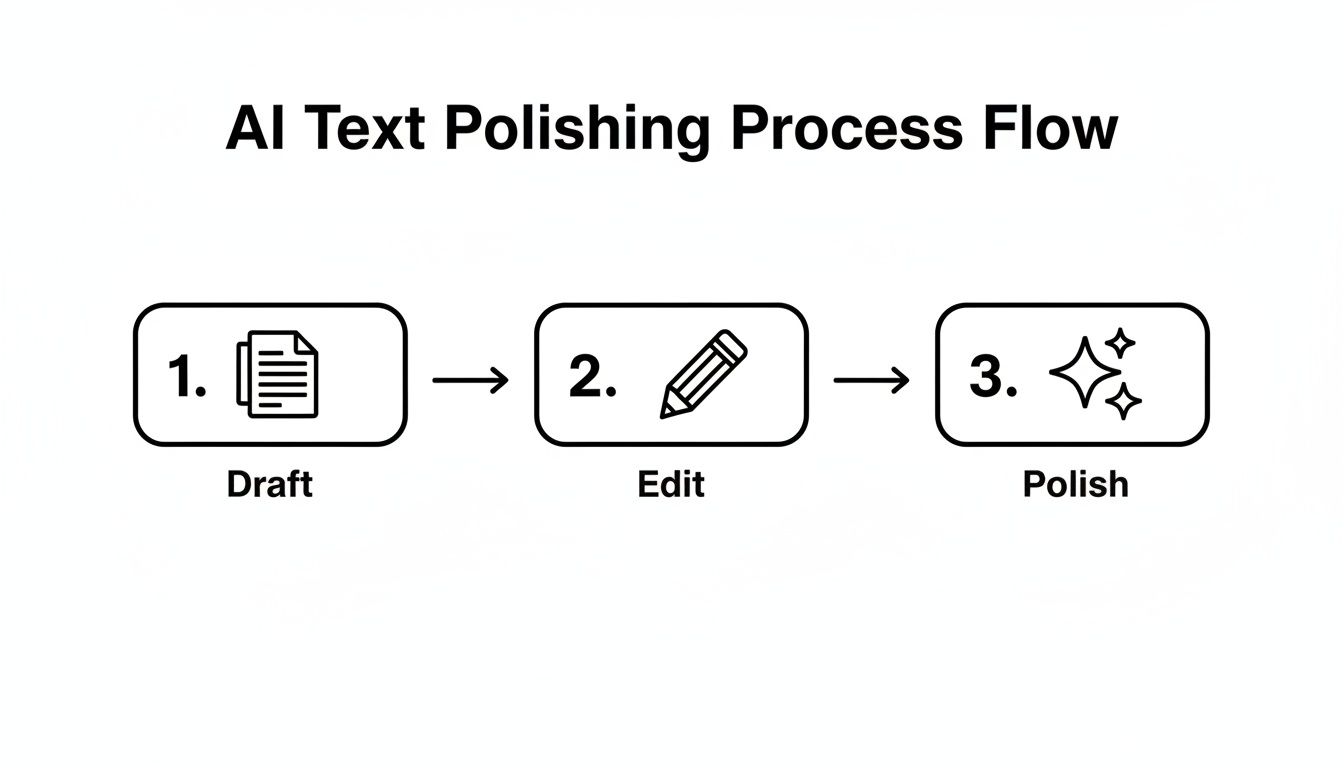
This isn't about random tweaks; it's a structured approach to move from a rough first draft to a final version that truly connects.
The Final Result: A Polished, Relatable Piece
After applying those changes, here’s our new and improved version:
After Text:
"Let's be honest, the switch to remote work has been a game-changer for so many of us. If you're working from home, you know what I'm talking about—you get so much more flexibility to balance your life and your job. Plus, think about all the time and money you're saving by not having to commute every day. It's not just a win for us, either. Companies are realizing they can hire talented people from anywhere in the world and cut down on huge office costs. It’s a total shift in how we think about the modern workplace."
See the difference? The core message is identical, but the "After" version is personal, easy to read, and actually connects with the reader. It feels like a real person sharing their thoughts.
And if you want to take your content that one extra step, you can get a free start with tools designed to help you achieve that 100% human score in just a few clicks.
Common Questions About Making AI Content Sound Human
As you get into the swing of editing AI-generated text, you'll probably run into a few recurring questions. It's a new frontier for a lot of us, so let's tackle some of the most common ones head-on. Getting these answers sorted will help you move forward and get better at humanizing AI text for free.
Do I Really Need to Humanize All AI Content?
Honestly, it depends on who’s going to see it. If you're just using AI to whip up some quick internal notes or spitball ideas for yourself, the raw output is probably fine. No need to polish something that's just for your own eyes.
But for anything public-facing? Absolutely. We're talking blog posts, marketing emails, social media captions—anything designed to connect with another human being. That final human touch is what turns a dry collection of data points into a story that builds trust and actually resonates with your audience.
Can Search Engines Like Google Actually Tell If My Content Was Written by AI?
Here's the thing: Google has been pretty open about this. They don't really care how the content was made. What they care about is whether it's helpful, high-quality, and written for people. It could be written by a human, an AI, or a centaur for all they care, as long as it provides value.
The problem is, raw, unedited AI content often fails that test. It can be repetitive, generic, and just plain unhelpful. So when you take the time to humanize your text, you're not just making it sound more natural—you're genuinely improving the quality, which is exactly what search engines are designed to reward.
At the end of the day, both search engines and your readers want the same thing: useful, engaging, and well-crafted content. Humanizing your AI drafts is the most direct way to hit that mark.
How Much Time Should I Budget for Humanizing an AI Article?
This is the classic "it depends" answer, but it really comes down to two things: the quality of your initial prompt and the length of the piece.
If you give the AI a killer prompt with tons of detail on tone, style, and structure, you might only need 15 to 20 minutes to clean up a standard-length article. A good first draft makes a world of difference.
On the other hand, if you're working with a longer, more complex article or the first draft came out super generic, you could be looking at an hour or more of editing. The best trick I've learned is to get better at prompt engineering. The more work you put in upfront, the less time you'll spend fixing things on the back end.
Will Using a Free "Humanizer" Tool Warp My Original Message?
The good ones won't. Reputable tools are built to be smart writing partners, not to take over your project. They're there to suggest better phrasing, smooth out clunky sentences, and help you find a more natural rhythm. The core message should always stay intact.
That said, you're always the one in the driver's seat. It's super important to review every suggestion and ask yourself, "Does this still sound like me? Does it fit my brand's voice?" Treat these tools as a helpful final check, but never give them the final say.
Ready to turn those robotic drafts into content that actually connects with people? A great place to start is with the free tools over at AI Busted. You can see for yourself how simple it is to get your content to a 100% human score. Give it a try at https://aibusted.com.